
Therapist practice · Updated 2026-11-10
HIPAA Risk Assessment for Therapists: How to Do a Security Risk Analysis in a Solo or Small Practice, With a Filled Example (Free Printable)
Ready-made printable: Therapy Progress Notes and Intake Templates Fillable PDF, 20 pages: SOAP, DAP and BIRP notes, intake, treatment plan and safety plan
Holiday 20% off: about $7.36, was $9 (EUR 8) · instant digital download
Try it free first: download a fillable sample (SOAP note and DAP note, PDF, 226 KB). Type into it on screen, then get the full pack. No email needed.

Ask a room of private practice therapists whether they have done a HIPAA risk analysis and you will hear three kinds of answers. Some say "my EHR is HIPAA compliant, so I'm covered." Some remember a checklist they downloaded years ago and never opened again. And a few say, honestly, that they have no idea what one is supposed to look like. Then an insurer's credentialing form asks for the date of the last risk assessment, a laptop goes missing from a car, or a phishing email gets someone's password, and the question stops being abstract.
This guide is for counselors, marriage and family therapists, clinical social workers, psychologists and other licensed clinicians in US private practice, especially solo and small group practices with no IT department. It explains what the HIPAA Security Rule actually requires (the risk analysis and risk management specifications in 45 CFR 164.308(a)(1)(ii)(A) and (B), and the documentation rules in 164.316), what HHS's own guidance says a risk analysis must include, how to find every place electronic client information lives in a small practice, how to rate likelihood and impact without a consultant, how to turn the results into a risk management plan, how "addressable" safeguards like encryption really work, how the free HHS Security Risk Assessment Tool fits in, what recent enforcement shows, and where the proposed 2025 Security Rule changes stand as of November 2026. It includes a filled example for a fictional solo practice, short scenarios and a free three page printable: a blank risk analysis worksheet, the same worksheet filled for a fictional practice, and an annual review checklist with a review log.
Jump to the free HIPAA risk analysis worksheet
This is educational information for licensed clinicians and trainees in the US. It is not legal or cybersecurity advice and does not create any professional relationship. The federal rules quoted here were checked against the eCFR text of 45 CFR part 164, subpart C, as in effect on November 1, 2026, against the HHS Guidance on Risk Analysis, the ASTP/ONC Security Risk Assessment Tool page, HHS enforcement announcements and the Federal Register and Unified Agenda entries for the proposed Security Rule changes. Your state may have its own data security and breach laws. For anything beyond a simple practice, or after any incident, get help from an attorney who knows health privacy and a qualified security professional. Every practice, clinician, system and detail in the examples on this page is fictional.
The short answer
If your practice is a HIPAA covered entity, the Security Rule requires you to "conduct an accurate and thorough assessment of the potential risks and vulnerabilities to the confidentiality, integrity, and availability of electronic protected health information" you hold (45 CFR 164.308(a)(1)(ii)(A)), and then to "implement security measures sufficient to reduce risks and vulnerabilities to a reasonable and appropriate level" (164.308(a)(1)(ii)(B)). Both are labeled "Required," not "Addressable."
- It is your job, not your EHR's. Your EHR vendor must do its own risk analysis for its systems. Yours covers your laptop, phone, email, home office, backups, staff, vendors and the way you actually work. A vendor's "HIPAA compliant" badge does not do it for you.
- There is no required form. HHS says the rule "does not prescribe a specific risk analysis methodology" and "does not require a specific format," but it must be documented (164.316(b)(1)).
- HHS's guidance lists the elements any method must cover: scope (all ePHI), data collection, threats and vulnerabilities, current security measures, likelihood, impact, level of risk, documentation, and periodic review.
- Small is allowed to be simple. The rule lets you consider your "size, complexity, and capabilities" and "the costs of security measures" (164.306(b)(2)). It does not let you skip the analysis.
- How often: the rule does not set a frequency. HHS says some entities do it "annually or as needed," and that it should be revisited after changes such as a security incident, new technology or staff turnover. A yearly review plus updates after changes is a sensible default for a small practice.
- Keep it six years. Security Rule documentation must be retained "for 6 years from the date of its creation or the date when it last was in effect, whichever is later" (164.316(b)(2)(i)).
- Enforcement keeps coming back to this. HHS's Office for Civil Rights runs a Risk Analysis Initiative, and its 2026 settlements, including one with a substance use disorder treatment provider after a phishing attack, cite the failure to do an accurate and thorough risk analysis.
- The 2025 proposed rule is still a proposal. HHS proposed major Security Rule changes in January 2025. As of November 2026 no final rule has been published, the Unified Agenda lists final action as a long term item planned for July 2027, and the current rule remains in effect.
Does the Security Rule apply to your practice?
The Security Rule applies to covered entities and business associates. A health care provider is a covered entity if it "transmits any health information in electronic form in connection with a transaction covered by" HIPAA (45 CFR 160.103). For most therapists, that means sending insurance claims electronically, checking eligibility electronically or receiving electronic remittances, either yourself or through a biller or clearinghouse acting for you. If any of that happens, treat your practice as covered.
A strictly cash pay practice that never conducts those transactions electronically may not be a covered entity. Even then, a written risk analysis is worth doing. Your ethics code requires you to protect confidential records, many states have their own data security or breach notification laws, and insurers, group practices and some clients will ask. Our business associate agreement guide walks through the covered entity question in more detail.
The Security Rule protects electronic protected health information (ePHI): client information that is created, received, maintained or transmitted electronically. Paper charts, a printed schedule on your desk and a sticky note with a callback number are covered by the Privacy Rule's general safeguards standard instead, which requires "appropriate administrative, technical, and physical safeguards to protect the privacy of protected health information" (164.530(c)). Many practices fold paper into the same risk analysis anyway, because the risks overlap: a lost bag can hold both a laptop and a folder of intake forms.
If you are a solo clinician working inside a group practice as an independent contractor, ask who the covered entity is. Usually the group is, and the group's risk analysis should include you, your devices and your home office if you see clients from there. If you have your own practice entity and your own EHR account, the analysis is yours.
What the rule actually says
The risk analysis sits inside the first standard of the Security Rule, the security management process, which requires you to "implement policies and procedures to prevent, detect, contain, and correct security violations" (164.308(a)(1)(i)). That standard has four required implementation specifications. The other parts of the rule you will touch while doing a risk analysis are listed with them.
| Rule | What it says | What it means for a small practice |
|---|---|---|
| 164.308(a)(1)(ii)(A) Risk analysis (Required) | "Conduct an accurate and thorough assessment of the potential risks and vulnerabilities to the confidentiality, integrity, and availability of electronic protected health information held by the covered entity or business associate." | Find all ePHI, what could go wrong with it, how likely and how bad. Write it down. |
| 164.308(a)(1)(ii)(B) Risk management (Required) | "Implement security measures sufficient to reduce risks and vulnerabilities to a reasonable and appropriate level to comply with 164.306(a)." | Act on what you found: a plan with actions, owners and dates, then do them. |
| 164.308(a)(1)(ii)(C) Sanction policy (Required) | "Apply appropriate sanctions against workforce members who fail to comply with the security policies and procedures." | A short written policy, even if your only workforce is a part time admin. |
| 164.308(a)(1)(ii)(D) Information system activity review (Required) | "Implement procedures to regularly review records of information system activity, such as audit logs, access reports, and security incident tracking reports." | Look at your EHR's access log and email sign in alerts on a schedule, and note that you did. |
| 164.306(a) General requirements | Ensure the "confidentiality, integrity, and availability" of all ePHI; protect against "any reasonably anticipated threats or hazards" and impermissible uses and disclosures; ensure workforce compliance. | This is the target the risk analysis measures you against. |
| 164.306(b) Flexibility of approach | You "may use any security measures" that reasonably and appropriately implement the standards, considering size and capabilities, technical infrastructure, "the costs of security measures" and "the probability and criticality of potential risks." | A solo practice does not need hospital tools. It does need reasoned, documented choices. |
| 164.306(d)(3) Addressable specifications | Assess whether each is "a reasonable and appropriate safeguard in its environment"; implement it if so; if not, "document why" and implement "an equivalent alternative measure if reasonable and appropriate." | Addressable does not mean optional. The risk analysis is where you make and record these decisions. |
| 164.306(e) Maintenance | "Review and modify the security measures implemented under this subpart as needed" and update documentation. | The analysis is a living document, not a one time project. |
| 164.308(a)(8) Evaluation | A "periodic technical and nontechnical evaluation" of how well your policies and procedures meet the rule, based first on the standards and then "in response to environmental or operational changes." | Your annual review checks whether what you planned actually happened. |
| 164.316(a) and (b) Policies, procedures and documentation | Keep policies and procedures "in written (which may be electronic) form"; if an "action, activity or assessment is required by this subpart to be documented, maintain a written (which may be electronic) record"; keep it six years; make it available to those who implement it; "review documentation periodically, and update as needed." | If it is not written down, you cannot show you did it. |
Two phrases in the risk analysis specification carry most of the weight. "Accurate and thorough" means it reflects your practice as it really runs, including the home office, the personal phone and the part time biller, not a generic template you signed. And "held by the covered entity" means everything you hold, wherever it is: HHS's guidance says the analysis "should take into account all of its e-PHI, regardless of the particular electronic medium in which it is created, received, maintained or transmitted or the source or location of its e-PHI."
Four things therapists confuse with a risk analysis
Several HIPAA documents have "risk" or "assessment" in the name. They are related but not the same, and mixing them up is one of the most common reasons a practice believes it has done a risk analysis when it has not.
| Document | What it is | Rule | When |
|---|---|---|---|
| Security risk analysis (this page) | An assessment of risks and vulnerabilities to all your ePHI: where it lives, threats, weaknesses, likelihood, impact, risk level | 164.308(a)(1)(ii)(A) | At the start, then periodically and after changes |
| Risk management plan | What you will do about the risks you found, by whom and by when, and which risks you accept and why | 164.308(a)(1)(ii)(B) | Right after the analysis, then kept current |
| Evaluation | A check of whether your policies, procedures and safeguards actually meet the Security Rule | 164.308(a)(8) | Periodically and after environmental or operational changes |
| Breach risk assessment | After a specific impermissible use or disclosure, the four factor assessment of whether there is "a low probability that the protected health information has been compromised" | 164.402 | After an incident, to decide whether notification is required |
A HIPAA training certificate is not a risk analysis. Neither is a signed business associate agreement, a vendor's security white paper, a privacy notice, or a compliance checklist that asks "Do you have a firewall? Yes or no." Checklists can be a useful input, but the analysis itself has to connect your actual systems to actual threats and say how likely and how serious each risk is.
The words HHS uses, in plain language
The Security Rule defines confidentiality, integrity and availability, and HHS's Guidance on Risk Analysis adapts the other key terms from NIST Special Publication 800-30. You do not need to memorize them, but they explain what each column on the worksheet is for.
- Confidentiality is "the property that data or information is not made available or disclosed to unauthorized persons or processes" (164.304). In a therapy practice: nobody who should not see a note, a diagnosis or even the fact that someone is a client, sees it.
- Integrity is "the property that data or information have not been altered or destroyed in an unauthorized manner." A note that is changed, corrupted or deleted without authorization is an integrity problem.
- Availability is "the property that data or information is accessible and useable upon demand by an authorized person." Ransomware, a dead laptop with the only copy of your notes, or an EHR outage on the day a client is in crisis are availability problems.
- Vulnerability, in the guidance's words from NIST, is "[a] flaw or weakness in system security procedures, design, implementation, or internal controls that could be exercised (accidentally triggered or intentionally exploited) and result in a security breach or a violation of the system's security policy." HHS adds that vulnerabilities can be non technical, such as "ineffective or non-existent policies, procedures, standards or guidelines." An unencrypted laptop is a vulnerability. So is "we never wrote down how to remove a former employee's access."
- Threat is "[t]he potential for a person or thing to exercise (accidentally trigger or intentionally exploit) a specific vulnerability." HHS groups threats as natural ("floods, earthquakes, tornadoes, and landslides"), human, both intentional ("network and computer based attacks, malicious software upload, and unauthorized access to e-PHI") and unintentional ("inadvertent data entry or deletion and inaccurate data entry"), and environmental ("power failures, pollution, chemicals, and liquid leakage").
- Risk "can be understood as a function of 1) the likelihood of a given threat triggering or exploiting a particular vulnerability, and 2) the resulting impact on the organization." No threat, no risk. No weakness, little risk. A likely threat against a real weakness with serious consequences is where your attention goes first.
What HHS says every risk analysis must include
HHS's Guidance on Risk Analysis says "there are numerous methods of performing risk analysis and there is no single method or 'best practice' that guarantees compliance with the Security Rule." It then explains "several elements a risk analysis must incorporate, regardless of the method employed." Here they are, with what each means in a small practice and where it lands on the free worksheet.
| Element (HHS guidance) | What HHS says | In a solo or small practice | Worksheet |
|---|---|---|---|
| Scope of the analysis | Covers "all e-PHI that an organization creates, receives, maintains, or transmits," on any electronic medium, "a single workstation as well as complex networks" | Every location (office, home office, remote staff) and every system, device and vendor | Practice and scope box |
| Data collection | "An organization must identify where the e-PHI is stored, received, maintained or transmitted," and the data gathered "must be documented" | A walk through of your week: intake, scheduling, sessions, notes, billing, messages, backups | Section 1 |
| Threats and vulnerabilities | "Identify and document reasonably anticipated threats" and vulnerabilities "which, if triggered or exploited by a threat, would create a risk of inappropriate access to or disclosure of e-PHI" | Phishing, lost devices, ransomware, misdirected messages, vendor outages, overheard sessions, a shared family computer | Section 2, threat and vulnerability columns |
| Current security measures | Assess and document the measures you use, "whether security measures required by the Security Rule are already in place, and if current security measures are configured and used properly" | Not just "we have a password," but whether the setting is actually on | Section 2, current safeguards |
| Likelihood | Take into account "the probability of potential risks"; document "all threat and vulnerability combinations with associated likelihood estimates" | A simple 1 to 3 rating with a reason | L column |
| Impact | "Assess the magnitude of the potential impact"; "qualitative or quantitative" methods or a combination are acceptable | How many clients, how sensitive, how long without records | I column |
| Level of risk | "Assign risk levels for all threat and vulnerability combinations"; the output should include "a list of corrective actions to be performed to mitigate each risk level" | Low, medium, high, with an action for anything not low | Risk and action columns |
| Finalize documentation | The rule "requires the risk analysis to be documented but does not require a specific format"; it is "a direct input to the risk management process" | Signed, dated, filed with your policies | Sign off line |
| Periodic review and updates | "The risk analysis process should be ongoing"; frequency "will vary" | Yearly, plus after changes | Page 3 checklist and log |
The guidance also lists starter questions adapted from NIST SP 800-66: "Have you identified the e-PHI within your organization? ... What are the external sources of e-PHI? For example, do vendors or consultants create, receive, maintain or transmit e-PHI? What are the human, natural, and environmental threats to information systems that contain e-PHI?" If you can answer those three honestly for your practice, you are already most of the way through the hardest part.
Step one in practice: find every place client information lives
Most small practices underestimate how many places ePHI ends up. HHS's February 2026 enforcement announcement on risk analysis recommends that providers "identify where ePHI is located in the organization, including how ePHI enters, flows through, and leaves the organization's information systems." The easiest way to do that is to walk through one ordinary week and write down every system that touches a client.
| Where it lives | What is usually there | Questions to ask |
|---|---|---|
| EHR or practice management system | Notes, intake, diagnoses, treatment plans, billing, scheduling, portal messages | Who has a login? Is MFA on? Can you export everything? Is there a signed BAA? Do you review the access log? |
| Telehealth platform | Session audio and video, waiting room names, chat, sometimes recordings or transcripts | Is recording off unless consented? Where are chat logs kept? Is the BAA on your plan? |
| Scheduling, intake questions, records requests, attachments, superbills | Business account with a BAA, or personal? MFA? What is sent unencrypted, and has each client agreed? | |
| Texts and phone | Reminders, client texts, voicemails, call logs, photos of documents | Do names appear on the lock screen? Is the phone shared with family? Does it back up to a personal cloud account? |
| Laptop or desktop | Downloaded reports, scanned forms, browser saved passwords, cached EHR data, a "notes" folder from before the EHR | Is the disk encrypted? Does it lock automatically? Is it used by anyone else? Is it updated? |
| Cloud storage and backups | Old records, exports, scanned intake packets, backups of the laptop | Is there a BAA? Are external drives encrypted? Have you ever tested a restore? |
| Scanner, copier, fax | Scans stored on the device, e-fax inboxes | Does the copier have a hard drive? Who disposes of it? Is e-fax covered by a BAA? |
| Billing and clearinghouse | Claims, remittances, eligibility responses, superbills | Does your biller work inside your EHR or download files? On which computer? |
| AI scribes and transcription | Session audio, transcripts, draft notes | Is there a BAA? How long is audio kept? Can the vendor train on it? Did clients consent? |
| Home office and remote staff | Everything above, on home networks, with family nearby | Separate device or user account? Router updated and default password changed? Can sessions be overheard? |
| Old devices | The laptop in the closet, the phone in the drawer, the USB stick from years ago | Wiped? Encrypted? Logged? Disposed of with a record? |
Do not forget "external sources," the vendors and consultants HHS mentions. Each vendor that creates, receives, maintains or transmits ePHI for you belongs in the analysis, both as a place your data lives and as a business associate that needs an agreement. Our BAA vendor checklist and log pairs well with this step.
Step two: threats and weaknesses that actually show up in therapy practices
You are not trying to imagine every possible disaster. You are trying to list the "reasonably anticipated" ones (164.306(a)(2)) and match each to the weakness it would exploit in your practice. The table below is a starting list, not a complete one; your practice may have risks that are not here and may not have some of these at all.
| Threat | Typical weakness in a small practice | What it can cause | Common safeguards |
|---|---|---|---|
| Phishing and email account takeover | No multi factor authentication; password reused from another site; no training | Someone reads or forwards client emails, or uses your account to phish clients | MFA on email and EHR, unique passwords in a password manager, short yearly training, sign in alerts |
| Lost or stolen laptop | Disk not encrypted; no auto lock; notes saved locally | Every file on the device may be exposed | Full disk encryption, auto lock, no local copies, remote locate and wipe |
| Lost or stolen phone | Weak or no passcode; message previews on the lock screen; texts with clients | Client names and messages visible to whoever finds it | Strong passcode, hidden previews, remote wipe, messaging through the EHR portal |
| Ransomware or malware | Outdated operating system; shared family computer; no backups or untested backups | No access to records for days; data stolen as well as locked | Automatic updates, a separate work device or user, reputable anti-malware, tested backups kept separate from the main device |
| Vendor breach or outage | No BAA; no offline copy of client contact details; no export | You cannot reach clients or access notes; you may have notification duties | A BAA with each vendor, a periodic secure export, an emergency client contact list kept securely offline |
| Misdirected message | Email autocomplete; similar client names; group texts | Client information sent to the wrong person | Turn off autocomplete for client contacts, double check before sending, use the portal |
| Former staff or contractor access | No checklist for ending access; shared logins | Someone who left can still log in | Unique logins for everyone, a written offboarding checklist, a review of active users |
| Overheard telehealth sessions | Shared walls, family at home, speakers instead of headphones | Confidential content heard by others | Headset, sound masking, a closed private room, a location and privacy check with the client |
| Improper disposal | Old laptops, phones and copier drives never wiped | Records recovered from discarded equipment | Wipe or destroy, keep a record, use a vendor that provides a certificate |
| Natural and environmental events | Only copy of data in one place; no plan for an office flood, fire or long power outage | Records unavailable, client care disrupted | A cloud EHR with vendor backups, your own export, a short contingency plan |
| Unapproved apps and AI tools | A free notes app, a consumer AI chatbot or a personal cloud drive used "just once" | Client data sits with a vendor that has no BAA | A written list of approved tools, a rule against pasting client details into unapproved apps |
Two threats come up again and again in recent enforcement announcements: phishing and ransomware. HHS's February 2026 settlement with a substance use disorder treatment provider followed "a successful phishing attack" in which "an unauthorized third party accessed ePHI through a workforce member's email account." Its April 2026 announcement resolved four ransomware investigations at once. Neither is exotic. Both are exactly what a small practice risk analysis should take seriously.
Step three: check what you already have, honestly
HHS asks you to assess not just whether a security measure exists, but whether it is "configured and used properly." This is where small practices find their easiest wins. Some honest questions:
- Is multi factor authentication actually turned on for your EHR, email, cloud storage and any admin account, or just available?
- If your laptop were stolen tonight, is the disk encrypted? On most current laptops this is a built in setting you can check in a minute.
- Does your screen lock on its own after a few minutes? Does your phone?
- When did you last install operating system updates? Are automatic updates on?
- Do you know where your backups are, and have you ever restored one?
- Does everyone who uses your systems have their own login, or do you share one with your admin?
- When your last contractor left, did you remove their access the same day?
- Does the EHR keep an access log, and have you ever looked at it?
Write down what is true now, not what you intend. The gap between the two is your risk management plan.
Step four: rate likelihood and impact without a consultant
HHS says an organization "may use either a qualitative or quantitative method or a combination of the two methods to measure the impact," and that the level of risk "could be determined, for example, by analyzing the values assigned to the likelihood of threat occurrence and resulting impact of threat occurrence." It gives averaging the two as one example. Any reasonable method works if you apply it consistently and write it down. The free worksheet uses a simple three point scale and multiplies the two ratings, which separates the top risks clearly.
| Rating | Likelihood in the next year | Impact if it happens |
|---|---|---|
| 1 | Unlikely: no history, strong controls, rare exposure | Minor: one or a few clients, little sensitive detail, fixed quickly |
| 2 | Possible: it happens to practices like yours; some controls in place | Moderate: several clients or sensitive details, or records unavailable for a day or so |
| 3 | Likely: common threat, weak or missing controls, or it has already happened | Serious: many clients, clinical notes or diagnoses, identity details, or days without records |
| Likelihood x Impact | Impact 1 | Impact 2 | Impact 3 |
|---|---|---|---|
| Likelihood 3 | 3 medium | 6 high | 9 high |
| Likelihood 2 | 2 low | 4 medium | 6 high |
| Likelihood 1 | 1 low | 2 low | 3 medium |
For therapists, impact deserves extra weight. Mental health records carry diagnoses, trauma histories, substance use, relationship details and sometimes information about third parties. Even a "small" exposure can harm a client badly. It is reasonable to rate the impact of any exposure of clinical notes as 3, and to rate exposure of the bare fact that someone is your client as at least 2.
Likelihood is where honesty matters most. Phishing is likely for almost everyone with an email address. A lost phone is possible for anyone who carries one. An earthquake depends on where you are. If something has already happened to you, rate it 3 until you have fixed the weakness that allowed it.
Step five: turn the results into a risk management plan
The risk analysis tells you where you stand. The risk management specification requires you to "implement security measures sufficient to reduce risks and vulnerabilities to a reasonable and appropriate level." HHS's guidance says the output of the analysis should include "a list of corrective actions to be performed to mitigate each risk level." In a small practice, the plan can be the last column of your risk register plus a short follow up page.
- Fix high risks first, and set dates in days or weeks, not "someday." Turning on MFA and disk encryption usually takes an afternoon.
- Give every action an owner, even if the owner is always you.
- Record accepted risks with a reason. If you decide a low risk is not worth the cost to reduce further, say so and say why. That is the flexibility 164.306(b) gives you, used properly.
- Update the register as actions are done, and re-rate the risk. A laptop with encryption turned on is a different risk from one without.
- Connect the plan to your policies. If the fix is "never text clinical details," it belongs in your written policy, your informed consent and your staff training.
Recent HHS corrective action plans show what OCR expects after a failure. The provider in the February 2026 settlement committed to "conduct and complete an accurate and thorough risk analysis," to "develop and implement a risk management plan to address and mitigate security risks and vulnerabilities identified in its risk analysis," to maintain written policies and procedures, and to train workforce members annually. Doing those four things before anything goes wrong is the whole point of this page.
Addressable does not mean optional: encryption, logoff and the rest
Many of the Security Rule's implementation specifications are marked "Addressable." HHS's guidance is blunt: "An addressable implementation specification is not optional." Under 164.306(d)(3), you must assess whether each one is reasonable and appropriate in your environment, implement it if it is, and if it is not, document why and implement an equivalent alternative measure if that is reasonable and appropriate. The risk analysis is the record of those decisions.
HHS's guidance calls the outcome of the risk analysis "a critical factor" in deciding addressable specifications and gives examples, including to "decide whether and how to use encryption" (164.312(a)(2)(iv) and (e)(2)(ii)), "identify what data to backup and how" (164.308(a)(7)(ii)(A)), and "determine the appropriate manner of protecting health information transmissions" (164.312(e)(1)). Note that the data backup plan itself is required; the risk analysis shapes how you do it.
| Specification | Required or addressable | In a small practice |
|---|---|---|
| Assigned security responsibility, 164.308(a)(2) | Standard | Name your security official in writing. In a solo practice, it is you. |
| Unique user identification, 164.312(a)(2)(i) | Required | Everyone has their own login. No shared accounts. |
| Emergency access procedure, 164.312(a)(2)(ii) | Required | How you reach records if your usual device or account is unavailable. |
| Automatic logoff, 164.312(a)(2)(iii) | Addressable | Screen and EHR session time outs. Easy to turn on; hard to justify not doing. |
| Encryption and decryption, 164.312(a)(2)(iv) | Addressable | Full disk encryption on laptops and phones, built into most current devices. It also matters for breach notification, because PHI encrypted consistent with HHS's guidance is not "unsecured" PHI. |
| Transmission encryption, 164.312(e)(2)(ii) | Addressable | Portal messaging, encrypted email options, secure telehealth. If you email clients unencrypted at their request, document their informed choice. |
| Audit controls, 164.312(b) | Standard (no separate specifications) | Use systems that "record and examine activity," and look at the logs. |
| Data backup plan, 164.308(a)(7)(ii)(A) | Required | "Retrievable exact copies." Know how your EHR backs up, and keep your own export where appropriate. |
| Disaster recovery and emergency mode operation plans, 164.308(a)(7)(ii)(B) and (C) | Required | A short written plan for an office fire, a dead laptop or a long EHR outage. |
| Testing and revision procedures, 164.308(a)(7)(ii)(D) | Addressable | Do one restore test a year and write down what happened. |
| Security reminders, protection from malicious software, log in monitoring, password management, 164.308(a)(5)(ii) | Addressable | Short periodic reminders, anti-malware and updates, sign in alerts, a password manager. |
| Disposal and media re-use, 164.310(d)(2)(i) and (ii) | Required | Wipe or destroy old devices and drives before they leave your control or get reused. |
| Accountability for hardware and media, 164.310(d)(2)(iii) | Addressable | A simple device list: what you have, who has it, where it went. |
If you decide an addressable specification is not reasonable and appropriate, the reason must be real and written down, with the alternative you use. "We didn't get around to it" is not a reason. "Our EHR vendor provides integrity controls for the records it hosts, and we store no ePHI locally" can be, if it is true.
The free HHS Security Risk Assessment Tool
The Office of the National Coordinator for Health Information Technology (ONC, now ASTP/ONC), in collaboration with HHS's Office for Civil Rights, built the Security Risk Assessment (SRA) Tool. HHS's risk analysis guidance page says its features "make it useful in assisting small and medium-sized health care practices and business associates in complying with" the Security Rule. As of the HealthIT.gov page last updated September 18, 2026:
- The current version is 3.7, offered as a Windows desktop application (64 bit Windows 7, 8, 10 and 11) and as an Excel workbook that "is intended to replace the legacy 'Paper Version'" for users without Windows.
- It "walks users through the security risk assessment process using a simple, wizard-based approach," with multiple choice questions, threat and vulnerability assessments, and asset and vendor management, and produces reports you can save and print.
- "All information entered into the tool is stored locally on the user's computer. HHS does not collect, view, store, or transmit any information entered into the SRA Tool."
- Version 3.7 added, among other things, a scope question to make sure assessments "account for every location that creates, receives, maintains, or transmits ePHI," a remote access and telework question, a modernized asset inventory and "potential review triggers for when to update security assessments."
- Its target audience is "medium and small providers," and the page says it "may not be appropriate for larger organizations."
Two cautions on the same page are worth taking seriously. Version 3.7 reminds users "that the SRA Tool survey alone may not identify all risks present in an organization." And: "Use of this tool is neither required by nor guarantees compliance with federal, state or local laws."
SRA Tool or a paper worksheet? They work well together. The SRA Tool is thorough and organized around the rule; it can feel long for a solo practice, and it only produces something useful if your answers reflect reality. A one page worksheet like the free printable below is faster to start, easy to update and easy to show someone, but it depends on you to think of the risks. A good approach for a small practice: use the worksheet to map where ePHI lives and list your real risks, run the SRA Tool or its workbook once a year to catch anything you missed, and file both.
Other free frameworks worth knowing about
- NIST SP 800-66 Revision 2 (February 2024), "Implementing the HIPAA Security Rule: A Cybersecurity Resource Guide," which NIST describes as "practical guidance and resources that can be used by regulated entities of all sizes." HHS's guidance notes that only federal agencies are required to follow NIST guidelines, but that they "represent the industry standard for good business practices with respect to standards for securing e-PHI."
- The HHS 405(d) program's Health Industry Cybersecurity Practices (HICP), voluntary practices developed with industry, including a technical volume for small health care organizations.
- Recognized security practices. A 2021 amendment to the HITECH Act (Public Law 116-321, adding section 13412) requires HHS, when making determinations about fines, audits and agreed remedies under the Security Rule, to consider whether an entity "adequately demonstrated that it had, for not less than the previous 12 months, recognized security practices in place." These include NIST practices and the 405(d) approaches. OCR treats this as voluntary and as a possible mitigating factor, and has said the practices must actually be in use, not just documented. It does not replace the risk analysis.
HHS's guidance says the Department "does not endorse or recommend any particular risk analysis or risk management model," and that adherence to these materials does not by itself "prove substantial compliance with the risk analysis requirements of the Security Rule." Frameworks help you do the analysis well. They are not the analysis.
What recent enforcement shows
OCR's Risk Analysis Initiative focuses enforcement on this requirement, and its press releases number the actions. Two from 2026 are directly relevant to small practices:
- February 19, 2026: Top of the World Ranch Treatment Center, a substance use disorder treatment provider in Illinois, described as OCR's 11th enforcement action in the Risk Analysis Initiative. After a phishing attack in which an unauthorized third party accessed ePHI through a workforce member's email account, the provider concluded that ePHI for 1,980 patients was compromised. OCR's investigation "found evidence that TWRTC failed to conduct an accurate and thorough risk analysis." The provider paid $103,000 and agreed to a corrective action plan that OCR will monitor for two years.
- March 5, 2026: MMG Fusion, LLC, a software company acting as a business associate, described as the 12th action. OCR's findings included failing to conduct an accurate and thorough risk analysis and failing to notify affected covered entities of a breach. It paid $10,000, and HHS noted that "in reaching this settlement, OCR considered the financial condition of MMG," with a corrective action plan monitored for three years.
OCR's director said in the February announcement: "Covered entities and business associates cannot protect electronic protected health information if they haven't identified potential risks and vulnerabilities to that health information." The same release lists OCR's recommended steps, which read like a small practice action list: identify where ePHI is located and how it flows; periodically conduct and update a risk analysis and implement risk management measures; ensure audit controls are in place and review system activity regularly; use mechanisms to authenticate users; "encrypt ePHI in transit and at rest to guard against unauthorized access to ePHI when appropriate"; incorporate lessons learned from incidents; and provide regular HIPAA training "specific to the organization and to the workforce members' respective job duties."
The lesson is not that OCR is hunting solo therapists. Investigations like these typically begin with a breach report or a complaint. The lesson is that when something does go wrong, one of the first documents anyone asks for is your risk analysis, and "we never did one" turns an unlucky incident into a compliance finding.
Documentation and retention
The risk analysis is one of the clearest examples of an "assessment" the Security Rule requires to be documented. Under 164.316(b):
- Keep it "in written (which may be electronic) form." A dated PDF or a signed paper worksheet both work.
- Retain it "for 6 years from the date of its creation or the date when it last was in effect, whichever is later." Because a risk analysis stays in effect until replaced, keep every version, each for six years after it is superseded.
- Make it "available to those persons responsible for implementing the procedures to which the documentation pertains." If your admin handles offboarding, they should be able to see that part.
- "Review documentation periodically, and update as needed, in response to environmental or operational changes affecting the security of the electronic protected health information."
A tidy way to file it: one folder named "Security" with your current risk analysis and risk management plan, prior versions, your security policies, your BAA vendor log, training records, your incident log and your contingency plan. Keep passwords, recovery codes and account numbers somewhere else entirely, such as a password manager, never on the worksheet.
How often to update it
HHS's guidance: "The Security Rule does not specify how frequently to perform risk analysis as part of a comprehensive risk management process. The frequency of performance will vary among covered entities. Some covered entities may perform these processes annually or as needed (e.g., bi-annual or every 3 years) depending on circumstances of their environment." It adds that the process "should be ongoing" and gives examples of events that should prompt a fresh look: an entity that "has experienced a security incident, has had change in ownership, turnover in key staff or management, is planning to incorporate new technology to make operations more efficient."
For a solo or small therapy practice, a practical rhythm is a full review once a year, on a date you will remember (license renewal month or the start of the calendar year both work), plus a quick update whenever any of these happens:
- A security incident, breach or near miss.
- A new EHR, telehealth platform, email provider, AI tool or other system that touches client data.
- Moving offices, starting to see clients from home, or someone starting remote work.
- Hiring, a staff member leaving, or a new contractor such as a biller.
- A change in ownership, or joining or leaving a group.
Proposed Security Rule changes: what is and is not in force
On December 27, 2024, HHS's Office for Civil Rights issued a notice of proposed rulemaking to modify the Security Rule, published in the Federal Register on January 6, 2025 at 90 FR 898. HHS's fact sheet lists many proposals that would affect risk analysis, including to:
- "Remove the distinction between 'required' and 'addressable' implementation specifications and make all implementation specifications required with specific, limited exceptions."
- "Require written documentation of all Security Rule policies, procedures, plans, and analyses."
- Require "a technology asset inventory and a network map that illustrates the movement of ePHI," revised on an ongoing basis but at least once every 12 months and after relevant changes.
- "Require greater specificity for conducting a risk analysis," including a written assessment that reviews the asset inventory and network map, identifies all reasonably anticipated threats and potential vulnerabilities, and assesses the risk level for each.
- Require encryption of ePHI at rest and in transit and multi factor authentication, each "with limited exceptions"; a compliance audit at least once every 12 months; vulnerability scanning at least every six months and penetration testing at least once every 12 months; and written procedures to restore certain systems and data within 72 hours.
Where it stands: the fact sheet says "while the Department is undertaking this rulemaking, the current Security Rule remains in effect." As of November 2026, the Federal Register shows the January 2025 proposal and no final rule, and the eCFR text of 45 CFR part 164, subpart C in effect on November 1, 2026 has not been changed by it. In the current Unified Agenda, HHS lists the rule (RIN 0945-AA22) under "Long-Term Actions" with final action planned for July 2027. Agenda dates are planning estimates, and a proposal can be finalized, changed or withdrawn. So the requirements on this page are the current rule, and the proposal is a useful preview: a practice that already keeps a device and system inventory, uses MFA and encryption, and writes down its risk analysis will be in good shape whatever the final rule says.
How to do a HIPAA risk analysis, step by step
- Confirm the Security Rule applies and name your security official. Check whether you or anyone acting for you conducts HIPAA transactions electronically. Then write down who is responsible for security, as 164.308(a)(2) requires. In a solo practice, it is you.
- Set the scope. List every location where client information is handled (office, home office, remote staff) and decide whether you will include paper records alongside ePHI.
- Map where ePHI lives and how it moves. Walk through one ordinary week, from first inquiry to closed chart, and tick every system, device and vendor on page 1 of the worksheet.
- List threats and weaknesses. For each place ePHI lives, write the reasonably anticipated threats and the weakness each would exploit, one pair per row. Start with phishing, lost devices, ransomware, vendor outages, misdirected messages and former staff access.
- Record your current safeguards honestly. Check settings, not memories: MFA on, disk encrypted, auto lock set, updates current, backups tested.
- Rate likelihood and impact on a simple scale, apply it consistently, and calculate a risk level for every row.
- Decide each addressable safeguard. Tick what is in place. For anything not in place, write why it is not reasonable and appropriate and what alternative you use, or add it to the plan.
- Write the risk management plan. An action, owner and due date for every medium and high risk, plus any risks you accept and why. Then do the actions.
- Sign, date and file it with your security policies, BAA vendor log and training records, and keep every version for at least six years after it is replaced.
- Review yearly and after changes. Use the checklist and log on page 3 to record each review, what changed and what you did about it.
Filled example: a fictional solo practice's risk analysis
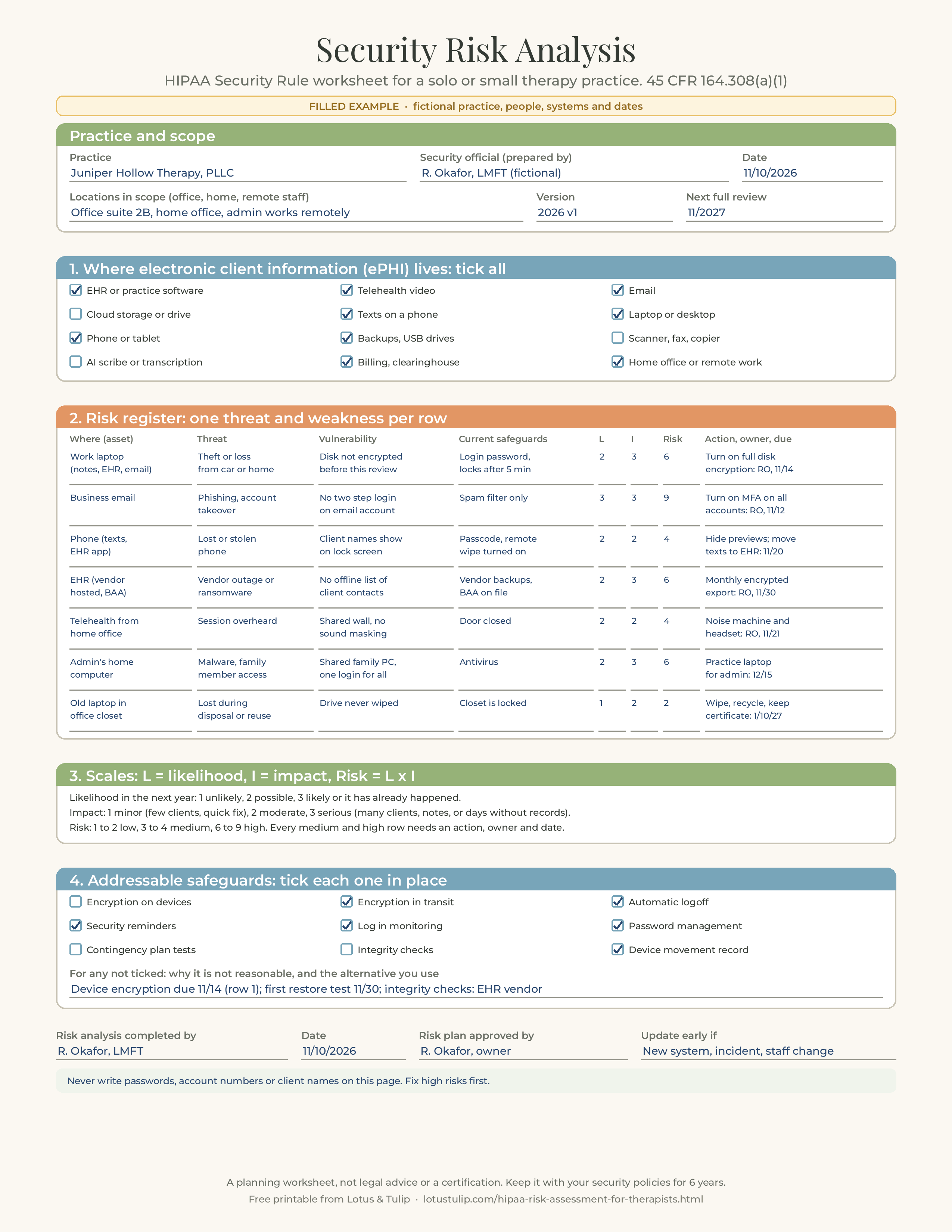
Juniper Hollow Therapy, PLLC (fictional) is owned by R. Okafor, LMFT (fictional), who sees about 22 clients a week, half in an office suite and half by telehealth from a home office. A part time administrator works remotely on scheduling and insurance follow up. The practice bills four commercial plans electronically through its cloud EHR, so it treats itself as a covered entity. In November 2026, while renewing her malpractice coverage, R. Okafor realized her only "risk assessment" was a checklist from 2021, and she spent two evenings doing it properly. Every name, system and detail here is invented.
Where ePHI lives (from her walk through)
| System or device | ePHI | Notes from the walk through |
|---|---|---|
| Cloud EHR (BAA on file) | Everything clinical and billing, portal messages, reminders | Owner and admin have separate logins; MFA on for the owner only |
| Telehealth (inside the EHR) | Live sessions; recording off | Covered by the EHR BAA |
| Business email (BAA on file) | Scheduling, some records requests, superbills sent at client request | No MFA; password last changed in 2023 |
| Owner's phone | Texts with about eight clients, EHR app, voicemail | Previews show client first names on the lock screen |
| Work laptop | EHR in the browser, downloaded reports, a scanned forms folder | Disk encryption was never turned on |
| Admin's home computer | EHR in the browser, insurance portal, downloaded remittances | Family computer with one shared login |
| External drive | Old records exported from a previous EHR in 2022 | Encrypted; kept in a locked drawer |
| Old laptop | Unknown, possibly old notes | In the office closet, never wiped |
Risk register and plan (summary)
| Risk | L | I | Level | Action, owner, due | Status at follow up |
|---|---|---|---|---|---|
| Phishing takes over business email (no MFA) | 3 | 3 | 9 high | Turn on MFA for email, EHR and cloud accounts; password manager; owner, 11/12 | Done 11/11; re-rated 2 x 3 = 6 until training is done 12/2026 |
| Work laptop lost or stolen (no disk encryption) | 2 | 3 | 6 high | Turn on full disk encryption; delete local scans after upload; owner, 11/14 | Done 11/13; re-rated 2 x 1 = 2 low |
| Admin's shared family computer infected or used by family | 2 | 3 | 6 high | Practice laptop for admin use only; until then, a separate user account; owner, 12/15 | Separate account 11/15; laptop ordered |
| EHR outage or vendor ransomware leaves no way to reach clients | 2 | 3 | 6 high | Monthly encrypted export of client contacts and schedule; written emergency plan; owner, 11/30 | First export 11/30; plan written |
| Lost phone shows client names and texts | 2 | 2 | 4 medium | Hide previews; move client texting to the EHR portal; update consent; owner, 11/20 | Previews hidden 11/10; portal switch in progress |
| Telehealth session overheard at home | 2 | 2 | 4 medium | Sound machine outside the door, headset; owner, 11/21 | Done 11/19 |
| Old laptop data recovered after disposal | 1 | 2 | 2 low | Wipe and recycle through a vendor that issues a certificate; owner, 1/10/2027 | Scheduled |
Three decisions in this example are worth copying. She fixed the two highest risks within a week, because both were free settings. She re-rated each risk after the fix instead of leaving the original numbers, so the document shows progress. And she wrote down one accepted risk in plain words: "Some clients have asked for superbills by email. We send them only to the address on file, after the client signs the email and text consent, and we keep a note of that choice. Risk accepted: low likelihood with MFA on, moderate impact. Review 11/2027."
Sample note to file with the analysis
"Security risk analysis, Juniper Hollow Therapy, PLLC, version 2026 v1, completed 11/10/2026 by R. Okafor, LMFT, security official. Scope: office suite 2B, home office, remote administrator's workspace; all ePHI plus paper intake. Method: walk through of systems and workflows; threat and vulnerability pairs rated on a 1 to 3 likelihood and impact scale (risk = L x I). Seven risks identified: four high, two medium, one low. Risk management plan attached with owners and dates. Addressable decisions recorded on page 1, section 4. Next full review 11/2027, or earlier after any incident or system change."
Sample log entry after a change
"03/04/2027. Trigger: started using an AI note drafting tool. BAA signed 03/01; audio deleted after 24 hours per settings; the BAA does not permit the vendor to use our data for model training. Added row 8: tool account takeover (L2, I3, 6 high); MFA on, admin has no access; re-rated 1 x 3 = 3 medium. Informed consent updated; clients asked to opt in. Reviewed by R. Okafor."
Three short scenarios
1. "My EHR is HIPAA compliant." A psychologist with a solo practice has used a well known cloud EHR for six years and assumed it covered her. Her new group contract asks for the date of her last risk analysis. She realizes the EHR's own analysis covers the EHR, not her laptop, phone, email or home office, and that her texts with clients and a folder of scanned intake forms on her desktop were never in anyone's analysis. She does the worksheet in an evening, turns on disk encryption and MFA, moves texting into the portal and sends the group the dated document.
2. The phishing email. A counselor's office manager enters her email password on a fake "shared document" page. Within an hour she notices forwarding rules she did not create. The practice changes the password, removes the rules, turns on MFA, calls its attorney and starts the four factor breach risk assessment under 164.402 to decide whether notification is required. Because its current risk analysis had already rated phishing as high and scheduled MFA (planned, but not yet done), it can show what it knew, what it planned and how fast it acted. It updates the analysis the same week and adds short phishing training for both staff members.
3. The move to telehealth from home. A clinical social worker gives up her office lease and moves entirely to telehealth from a spare bedroom. Her old risk analysis assumed a locked office with a locked file cabinet. She treats the move as a trigger, adds the home office, home router and family members to the scope, buys a headset and a white noise machine, changes the router's default admin password, sets up a separate user account on her computer, and logs the update on page 3.
Common risk analysis mistakes in therapy practices
- Assuming the EHR vendor's compliance covers the practice.
- Treating a training certificate, a BAA or a privacy notice as the risk analysis.
- Leaving out the home office, personal phone, remote staff or old devices.
- Writing intentions ("we use encryption") instead of verified facts ("disk encryption confirmed on laptop 11/13").
- Rating everything "low" so the document looks good, which leaves no plan and no defense.
- Listing risks but never assigning actions, owners or dates.
- Treating "addressable" as optional and leaving no written reason for skipped safeguards.
- Doing it once and never updating it after a move, a new tool or a staff change.
- Writing passwords, recovery codes or account numbers on the risk analysis.
- Throwing away last year's version instead of keeping each version for six years.
Free printable: HIPAA risk analysis worksheet, filled example and review log
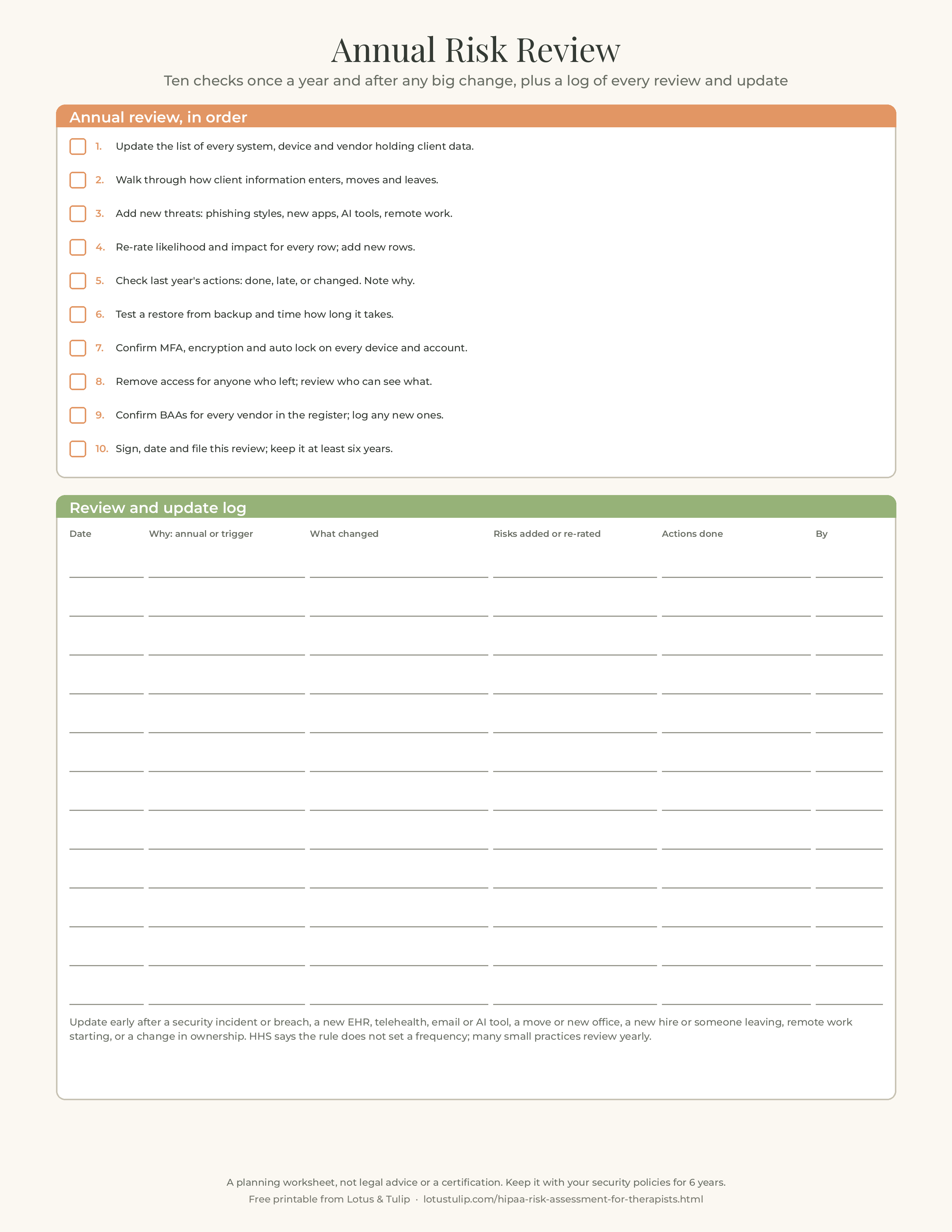
The free printable has three US Letter pages. Page 1 is a blank security risk analysis worksheet for a solo or small practice: practice, security official, date, locations in scope, version and next review; tick boxes for where ePHI lives (EHR, telehealth, email, cloud storage, texts on a phone, laptop or desktop, phone or tablet, backups and USB drives, scanner or fax, AI scribe or transcription, billing and clearinghouse, home office or remote work); a seven row risk register with columns for asset, threat, vulnerability, current safeguards, likelihood, impact, risk, and action, owner and due date; the likelihood, impact and risk scales; tick boxes for common addressable safeguards with a line for why any are not in place; and a sign off line. Page 2 is the same worksheet filled for the fictional Juniper Hollow Therapy, PLLC. Page 3 is a ten point annual review checklist and a twelve row review and update log, with a list of events that should prompt an early update.
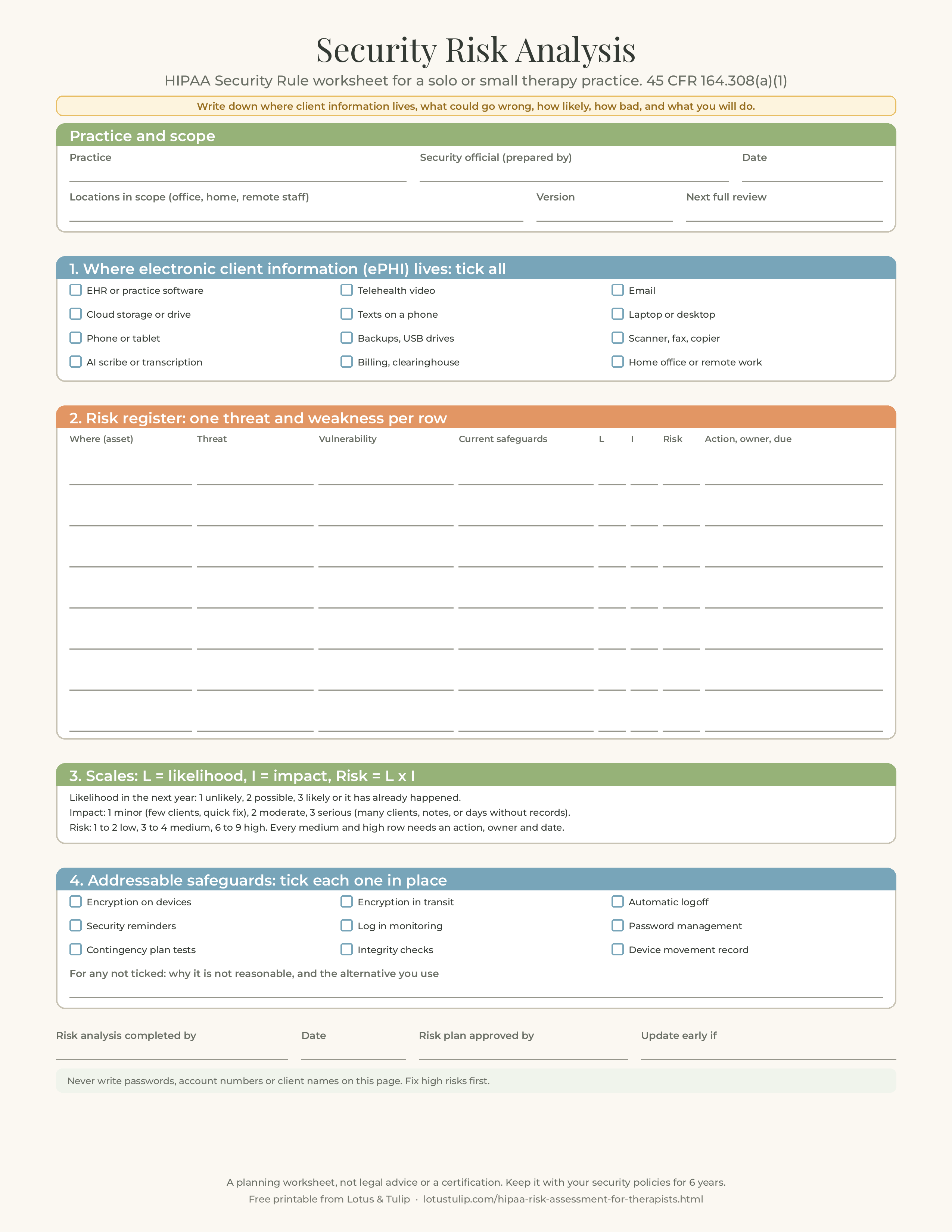
Download the free HIPAA risk analysis worksheet (PDF, 3 pages)
Rather type than handwrite? The free PDF above is for printing. Therapy Progress Notes and Intake Templates comes as a fillable PDF you type straight into (604 fields in Adobe Acrobat Reader), plus the printable version: SOAP, DAP and BIRP notes, intake, treatment plan and safety plan, 20 pages. Holiday 20% off: about $7.36, was $9 (EUR 8) · instant digital download
Buy on EtsyPrefer single images? Page 1: blank risk analysis worksheet (PNG) · Page 2: filled fictional example (PNG) · Page 3: annual review checklist and log (PNG)
Free to print and use in your own practice. Please link to this page rather than re-uploading the file. This worksheet helps you organize and document a security risk analysis. It does not certify compliance, it is not legal or cybersecurity advice, and a worksheet alone may not identify every risk in your practice. Consider running the free HHS SRA Tool as well, and get professional help after any incident.
Related resources
- HIPAA breach notification for therapists: the four factor risk assessment, 60 day deadlines and a free incident log
- Telehealth across state lines for therapists
- Duty to warn for therapists: Tarasoff, state laws, HIPAA and a free documentation worksheet
- Closing a therapy private practice: checklist, timeline, client letters, records plan and free printable
- Business associate agreements for therapists, with a filled vendor log
- Notice of privacy practices for therapists, with a filled example
- Professional will for therapists: clinical executor, records custodian and a free printable
- Telehealth progress note template
- Informed consent for therapy template
- Release of information form for therapists
- Psychotherapy notes vs progress notes
- Treatment summary template and the HIPAA right of access
- Credit card authorization form for therapists
Sources: 45 CFR 160.103; 164.304 (definitions); 164.306 (general rules, flexibility of approach, addressable specifications, maintenance); 164.308 (administrative safeguards, including 164.308(a)(1)(ii)(A) to (D), (a)(2), (a)(5), (a)(7) and (a)(8)); 164.310; 164.312; 164.316; 164.402; 164.530(c), eCFR text as in effect on November 1, 2026; HHS Office for Civil Rights, Guidance on Risk Analysis (content last reviewed August 12, 2026); ASTP/ONC, Security Risk Assessment Tool page, version 3.7 (last updated September 18, 2026); NIST SP 800-66 Rev. 2 (February 2024); Public Law 116-321 (HITECH Act section 13412) and HHS request for information, 87 FR 19833 (April 6, 2022); HHS press releases of February 19, 2026 (Top of the World Ranch Treatment Center), March 5, 2026 (MMG Fusion, LLC) and April 23, 2026 (four ransomware settlements); HHS, HIPAA Security Rule NPRM fact sheet (December 27, 2024); 90 FR 898 (January 6, 2025); Unified Agenda entry for RIN 0945-AA22 (current edition: Long-Term Actions, final action 07/2027). Rules and guidance change; check the current versions.
FAQ
Do therapists need a HIPAA risk assessment?
If your practice is a HIPAA covered entity, for example because you or your biller send insurance claims electronically, yes. The Security Rule requires an "accurate and thorough assessment of the potential risks and vulnerabilities" to the electronic protected health information you hold (45 CFR 164.308(a)(1)(ii)(A)), and security measures that reduce those risks to a reasonable and appropriate level (164.308(a)(1)(ii)(B)). Both are required implementation specifications, and the analysis must be documented.
Is there an official HIPAA risk assessment template?
No form is required. HHS says the Security Rule does not prescribe a specific methodology or format. ASTP/ONC and HHS's Office for Civil Rights offer the free Security Risk Assessment Tool, version 3.7, as a Windows application or an Excel workbook designed for small and medium sized practices, but its page notes that using it is neither required by law nor a guarantee of compliance. A simple worksheet like the free printable on this page also works if it covers all of your ePHI, threats, vulnerabilities, current safeguards, likelihood, impact and risk level, and is documented.
How often should a therapy practice do a security risk analysis?
The Security Rule does not set a frequency. HHS's guidance says some entities perform it annually or as needed, and that it should be revisited after events like a security incident, new technology, staff turnover or a change in ownership. For a solo or small practice, a full review once a year plus an update after any of those changes is a sensible default.
Does my EHR's HIPAA compliance cover my risk analysis?
No. Your EHR vendor is a business associate with its own Security Rule duties for its systems. Your risk analysis covers everything your practice holds and does: your laptop, phone, email, home office, backups, staff, other vendors and workflows. Vendor safeguards are an input to your analysis, recorded as current safeguards, but they do not replace it.
Has the 2025 HIPAA Security Rule update taken effect?
No. HHS proposed the changes on December 27, 2024 (published January 6, 2025, 90 FR 898). As of November 2026 no final rule has been published, the current Unified Agenda lists final action as a long term item planned for July 2027, and HHS has said the current Security Rule remains in effect while it undertakes the rulemaking. The requirements on this page are the current rule.